
“We have five AI agents in our organisation.”
Okay, but are you sure it's only five?
Maybe someone counted the agents built in Copilot Studio. But what about agents created with Microsoft 365 Copilot Agent Builder?
And what about agents nobody uses anymore? Or agents owned by someone who left the company six months ago?
Before we start talking about governance, we need to know what's actually out there.
A good place to start is the Power Platform Admin Center.
Under Manage > Inventory, admins can discover agents created in Copilot Studio and Agent Builder, depending on the inventory capabilities and permissions available in their tenant.
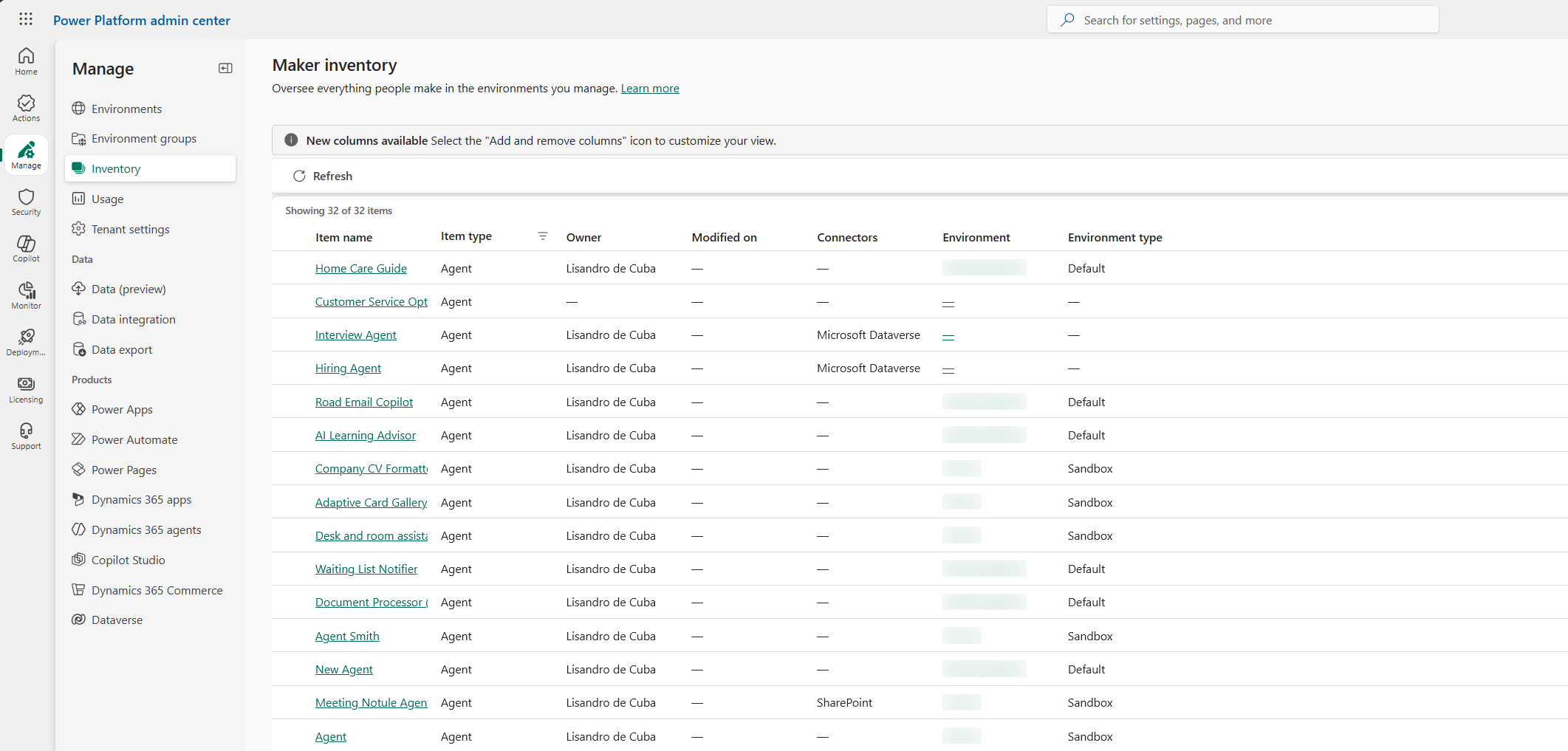
But finding an agent is only the beginning.
Who owns it? Who uses it? What data can it access? Can it perform actions?
And perhaps the most overlooked question: Does anyone still need it?
Not all of this information will be available in one admin screen. Some details need checking elsewhere.
My suggestion? Start small.
Pick one environment, check which agents you can find and write down what's missing.
You don't need a complicated governance process on day one. First, you need a reliable picture of what you're managing.
And remember, an inventory is only as useful as the information you can trust. Some views may reflect published versions rather than changes still being worked on.
This is part 2 of my series on Microsoft Copilot and AI agent governance.
Next up: why a personal helper and an agent that can change business data probably shouldn't follow exactly the same rules.
If you had to review every agent in your organisation tomorrow, would you even know where to start?